Why small models
Over the last few months, I became a bit obsessed with small language models (SLMs). Compared to LLMs (large language models), having a small model that is fit for a specific task and able to call tools has been a very exciting idea. Not because I don’t want to pay for LLM tokens (I happily pay for my subscriptions while venture capitalists subsidize it), but because there are some tasks (read most tasks) where you don’t really need that much compute—especially not by sending requests halfway across the world.
On-device models, edge models, small language models—whatever we want to call them—are a great answer to many of the problems that modern-day developers face. You want to use chat-based interactions in your apps, yet you don’t want to handle the financial burden of paying for the tokens. Even small models, when scaled to thousands of users per day, can put a significant dent in your profit margins.
On-device models are a missing piece of the puzzle—in most cases, at least. They provide inference on the user’s device and, for tasks like translation, summarization or language detection, serve their purpose without per-token API billing. From Mistral 7B, through Google’s Gemma 4, to Bonsai 27B, on-device AI is starting to feel less like a POC and more like a capable system.
These days, having a simple chat with an on-device model like Bonsai 27B can feel similar to chatting with GPT-5.6-terra or Claude’s Haiku. But chatting and RAG are not really the hot things anymore—we expect tool calling.
This was, for a long time, the Achilles’ heel of most small models. They had both small context windows and a limited number of parameters. Furthermore, distilling larger models’ wisdom into smaller models, or using mixture-of-experts architectures with selective activation, was not all that common.
But a lot of those things changed. Now we have many capable open-source models (usually thanks to borrowing knowledge from state-of-the-art models), and they come packaged with easy-to-use software like Ollama or LM Studio.
But trying to harness this into a web application is a nightmare.
Obviously, you can run these “free” models on your own infrastructure, but that leaves you (as a developer) with the same responsibilities as when using state-of-the-art models: user privacy, data retention, uptime, latency, etc. Plus, you now own the infrastructure, which needs maintenance.
You soon figure out that the $500/month Anthropic bill is not that bad and abandon the idea of an on-premises LLM altogether.
Chrome changes the equation
But Chrome’s team shipped something that changes this equation.
With a much-reported public uproar about a roughly 4 GB Gemini Nano weights file landing on some users’ hard drives one morning, the equation has switched.1 It switched from hosting models yourself to simply allowing Chrome to run inference on the user’s machine—all through a single API interface that you can access with a few lines of JavaScript.
Here is how it works:
From Chrome 148, regular web pages can use the new LanguageModel interface to create a session backed by Gemini Nano; Chrome extensions have had stable access since Chrome 138.2 This Nano model is not something to write home about, but it does handle a lot of the single-shot interactions that you often use LLMs for. For example:
- Translating text in a text area for a user
- Summarising an article
- Creating a summary of comments on a website
- Creating a to-do list from an email
Chrome’s built-in AI APIs target all of the above while keeping inference in the user’s browser (read privacy) and removing the per-token API bill.3 This shifts the compute from your servers (or someone else’s) directly to the user’s browser.
The basic Prompt API really is only a few lines. If a model download is needed, create the session from a user interaction such as a click:
const options = {
  expectedInputs: [{ type: "text", languages: ["en"] }],
  expectedOutputs: [{ type: "text", languages: ["en"] }],
};

if (!("LanguageModel" in self)) {
  throw new Error("Chrome's Prompt API is not supported.");
}

if ((await LanguageModel.availability(options)) === "unavailable") {
  throw new Error("Chrome's on-device model is unavailable.");
}

const session = await LanguageModel.create(options);

try {
  console.log(await session.prompt("Create a to-do list from this email."));
} finally {
  session.destroy();
}
This is impressive in itself. But let’s try to push this to the limit.
Why Mermaid
Here is what I’ve been working on, on and off, for a couple of months.
I love diagrams. There it is, I said it. I love them because I am a visual learner (also with a slight ADD), so processing information through images is much easier for me compared with reading long reports. I discovered Mermaid diagrams through my friend’s app, which supported them while they were still a very novel product. I fell in love with the simplicity and ease of use. Instead of fighting diagramming software—each with different shortcuts and requiring a subscription—you can simply write out text that immediately renders into a chart. And you can pick from dozens of different charts, provide your data, and the system handles the layouts, routing, connections, etc. It’s an amazing product.
What I’ve been working on is a simple application where I can use AI to help me with my diagrams. From my text input, the LLM understands what I want to create and updates the canvas. (I forgot to mention that, compared with visual canvases, making flowcharts using only code is not exactly fast.)
I wanted to see if the on-device LLM could do this while remaining 100% on my own computer and working for anyone on a supported desktop Chrome setup to whom I send the link. So I got to work.
A lightweight harness
The first thing was making the harness. The obvious first choice would be to use LangChain. But LangChain needs a model integration, and at the time I couldn’t find one for Chrome’s LanguageModel interface. Therefore, we would need to build our own adapter to fit LangChain. This seems like a bit of a thankless job, so let’s instead build our own lightweight harness.
Without going into too much detail, the good thing about Chrome’s Prompt API is that it supports structured output through a JSON Schema.4 Therefore, we can instruct our model to return a JSON response containing the tool parameters it needs. From there, we create a simple execution loop, allow the model to make a few rounds, and we have ourselves a small agent harness.
Given that our agent only needs to create Mermaid charts, we give it only four tools to manipulate the chart, update the code or patch its parts: read_diagram, reset_board, create_diagram and patch_diagram.
The core of the harness is similarly small:
for (let step = 1; step <= 8; step += 1) {
  const decision = JSON.parse(
    await session.prompt(prompt, { responseConstraint: toolSchema }),
  );

  if (decision.action === "final") return decision.answer;

  const result = await applyTool(decision.action, decision.arguments);
  prompt = `Tool ${decision.action} returned ${JSON.stringify(result)}.`;
}

throw new Error("The agent exceeded the eight-step limit.");
The actual applyTool function validates the arguments and the resulting Mermaid syntax before changing the board. The eight-step limit also prevents a confused model from calling tools forever.
Context is the constraint
With a small enough system prompt and tool contract, we get roughly 1,000 tokens’ worth of starting context.
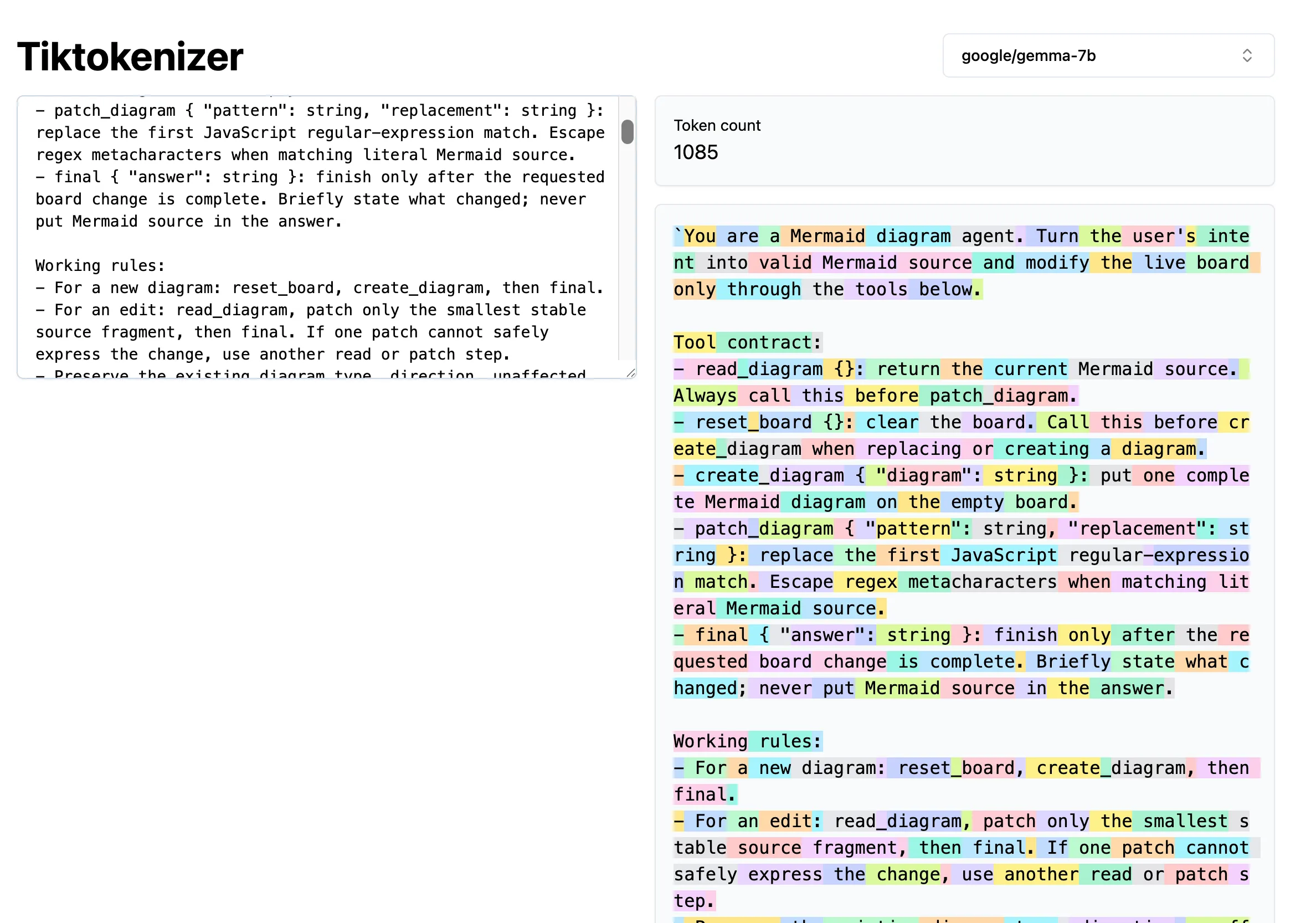
This is important because the live session in this build reports a 9,216-token context window. Chrome exposes the real values as session.contextUsage and session.contextWindow, so they should be read at runtime rather than hard-coded.5
That leaves roughly 8,000 tokens after the initial prompt—enough, in my tests, for a 15–20-turn conversation with the agent before we need to summarise the context. The exact number varies because a single user request can itself require several model turns.
The result
So now that we have our model, our harness and tools, let’s see how this works in action.
We simply prompt the on-device model. It uses the available tools and renders our diagrams for us.
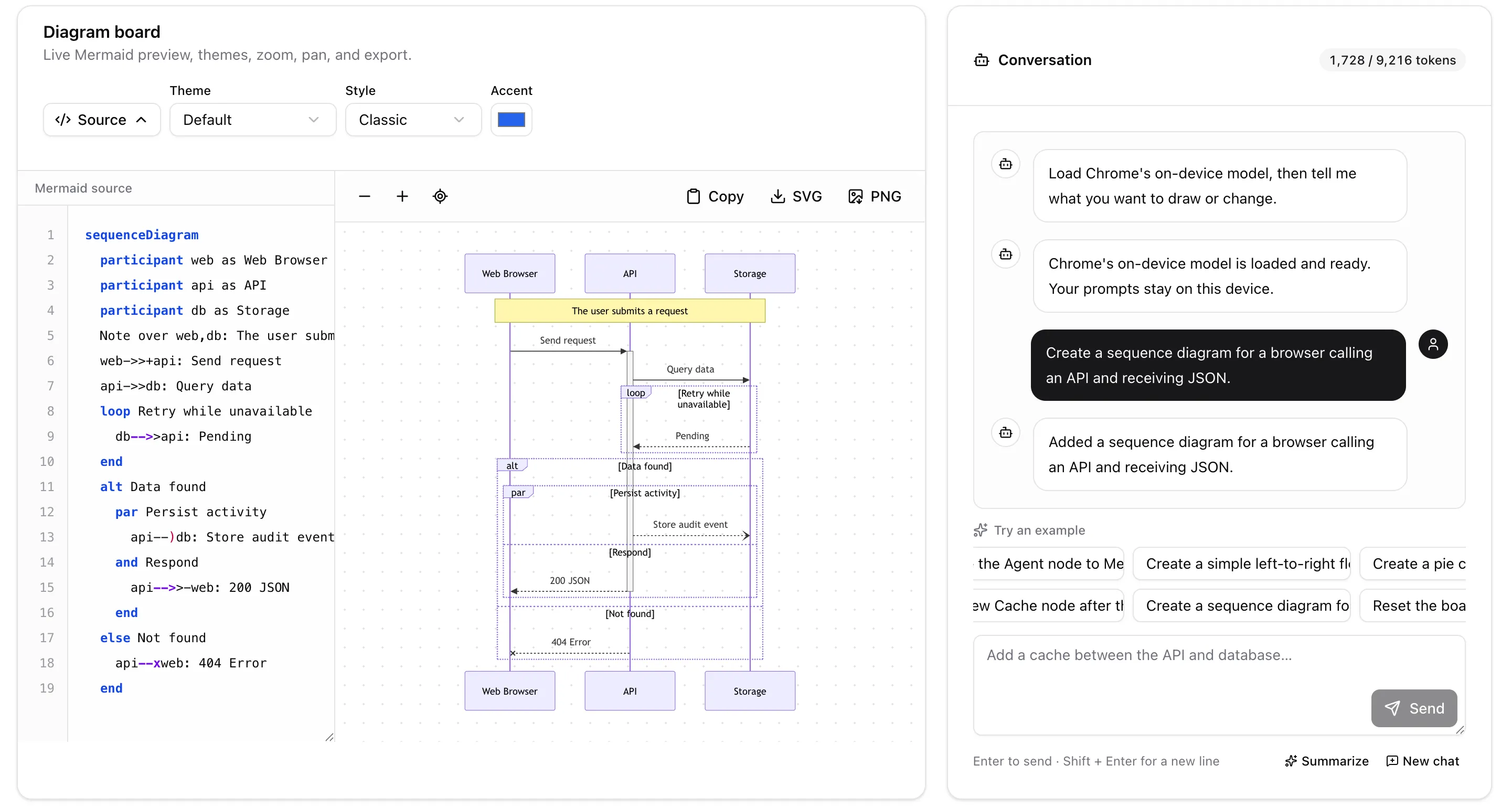
And there we have it—an on-device model available to eligible desktop Chrome users that is more than capable of assisting with simple tasks, without requiring a vendor API key or per-token billing, and without sending the prompt to a model provider.
If you want to play around with the demo, I’ve deployed it on Vercel
If you enjoyed this article, please consider following me on LinkedIn.
Footnotes
-
The Verge, “Chrome’s AI features may be hogging 4GB of your computer storage”; Chrome’s model-management documentation. ↩
-
Chrome for Developers, “Built-in AI APIs”; Chrome for Developers, “The Prompt API”. ↩
-
Chrome for Developers, “Get started with built-in AI”. Chrome says the initial model download needs a network connection, but subsequent inference can run offline and sends no input to Google or a third party. ↩
-
Chrome for Developers, “Structured output support for the Prompt API”. ↩