I got tired of checking /usage
AI usage limits usually become visible at the least useful possible moment: when a tool tells you to come back later, halfway through the thing you planned to ship.
I currently use several AI providers and local agent tools at the same time. Claude Code might be working on one project, Codex on another, while Hermes or OpenClaw quietly handles something in the background. Each provider has its own subscription, rolling window, weekly allowance, credits, and reset clock. None of them particularly cares what the others are doing.
I got tired of checking /usage often enough that it became a small ritual. The command itself takes seconds. Remembering to run it, switching context, and interpreting several different limits is the annoying part.
So I built LimitBar, a small macOS utility that turns those limits into battery icons in the menu bar.
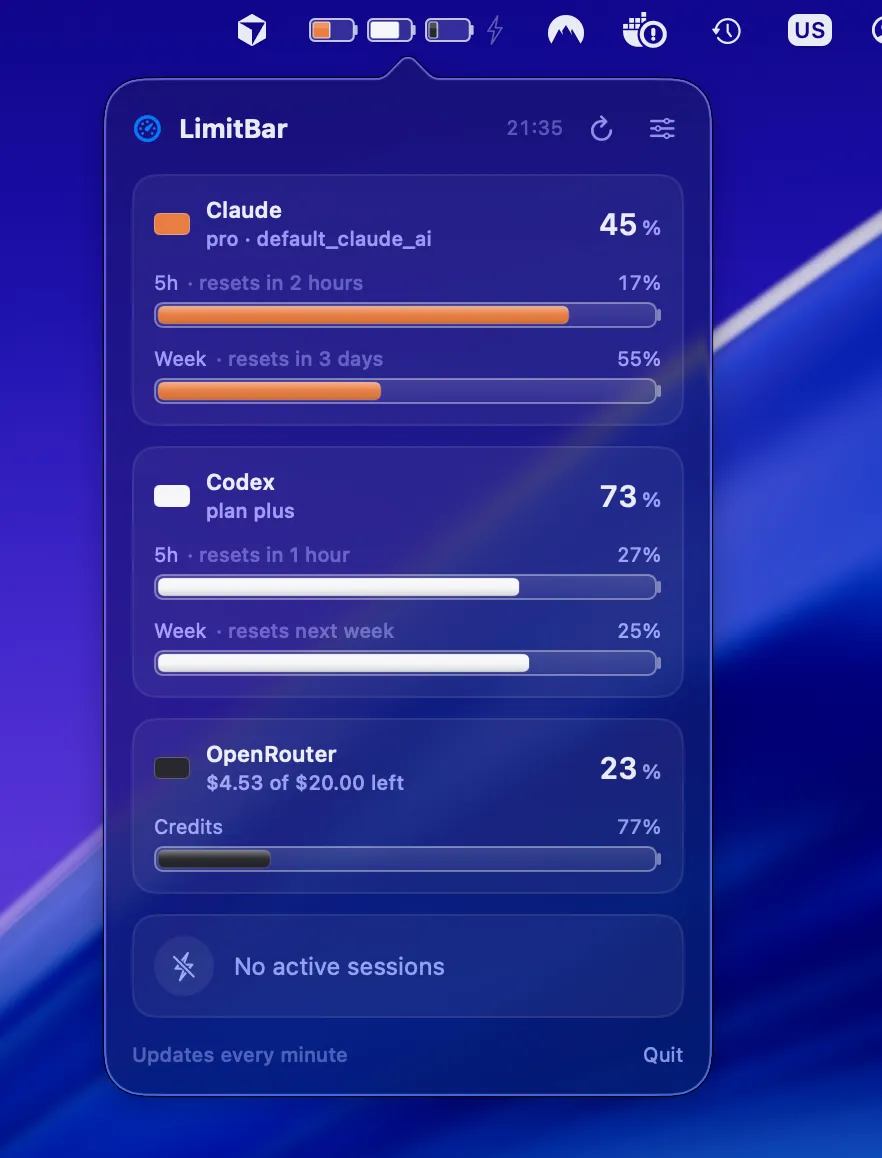
The battery icon is the interface
LimitBar shows one battery for each configured provider: Claude, Codex, Gemini, and OpenRouter. The fill represents the quota you have left in the most constrained window, so a full battery means you still have plenty of headroom.
That is enough information for the menu bar. You can see whether starting another long agent run is sensible without opening a dashboard or typing a command.
Clicking the icon opens the detailed view. It shows the exact percentage for each usage window, when each one resets, and your remaining OpenRouter credits. Claude is orange, Codex is white, Gemini is blue, and OpenRouter is black, which makes the providers easy to distinguish without turning the menu bar into a miniature trading terminal.
LimitBar can also notify you when a quota resets. This sounds like a small detail, but the alternative is checking /usage again just to discover that the tokens returned twenty minutes ago.
The lightning bolt catches background usage
The more interesting problem is not always the limit itself. It is figuring out whether something is consuming tokens right now.
When any detected local session is processing tokens, LimitBar lights up a bolt and shows live tokens per minute in the popover. This matters when several tools are running together. A forgotten Claude Code session, an OpenClaw workflow, and a Hermes task can turn a healthy allowance into a nearly empty battery surprisingly quickly.
It is not meant to be a full observability platform. It answers the useful question: is something burning tokens in the background, and how fast?
That is usually enough to catch the problem before the provider catches it for you.
Credentials stay with the provider tools
LimitBar does not add another account system. It reads the credentials already created by the official command-line tools: Claude Code from the macOS Keychain, Codex and Gemini from their local credential files, and OpenRouter from an environment variable.
Those credentials are used only to request usage information from the providers’ own endpoints. There is no LimitBar backend, analytics service, or telemetry collector in the middle. The app reads the values, renders the gauges, and keeps the result on your Mac.
The Keychain access can also be disabled in Settings. And because the project is open source, the credential handling and provider requests are there to inspect rather than hidden behind a reassuring privacy paragraph and a very ambitious cookie banner.
Installation is deliberately boring
LimitBar requires macOS 14 or later and a working Swift toolchain. If swift --version already works on your machine, setup is a few commands:
git clone https://github.com/MichaelMares/LimitBar.git
cd LimitBar
./scripts/bundle.sh
cp -R LimitBar.app /Applications/
open /Applications/LimitBar.app
The app then detects providers after you have signed in through their official CLIs. OpenRouter needs an OPENROUTER_KEY environment variable instead.
LimitBar is distributed as source and signed locally, but it is not notarized. If Gatekeeper blocks the first launch, use Open from the app’s context menu or allow it under System Settings → Privacy & Security.
A small utility for more predictable work
LimitBar does not make the subscriptions cheaper, increase the limits, or prevent an enthusiastic agent from consuming half a weekly allowance while you make coffee. It simply makes the invisible resource visible.
That changes how I schedule work. I can see whether Claude has enough room for a long session, whether Codex is closer to its reset, whether OpenRouter credits are getting low, and whether some background process is already active. I can start the right task with the right provider instead of discovering the constraint after the work has started.
The source, setup instructions, and provider details are available in the LimitBar GitHub repository.
It will not give the subscriptions a bigger battery. It does make it much harder to discover that the battery is empty exactly when something needs to ship.